
Apple Ecosystem
Apple IT Security Features: T2 Chip and the Secure Enclave
Paul Febre

Apple Business, the free platform Apple launched in 2026, gives every company a simple way to set up and manage Macs, iPhones and iPads. It does not give them a security program. Monitoring for threats, keeping every device patched and proving compliance still take people who know Apple and have the time to do it.
For businesses, that is the real decision: not which free tool to turn on, but who will make sure the company’s Apple devices stay secure as the team grows, and whether a dedicated platform like Jamf belongs in the plan.
In April 2026, Apple combined three programs into one platform called Apple Business:
The built-in device management is now free, and Apple added features such as preconfigured device settings, zero-touch deployment and connections to identity providers like Microsoft Entra ID and Google Workspace. It lowers the cost of getting started, but it is a starting point. Growing businesses that need stronger security, detailed policies and reporting usually manage their Apple devices with Jamf, a platform built specifically for Apple, with an IT partner who knows how to run it.
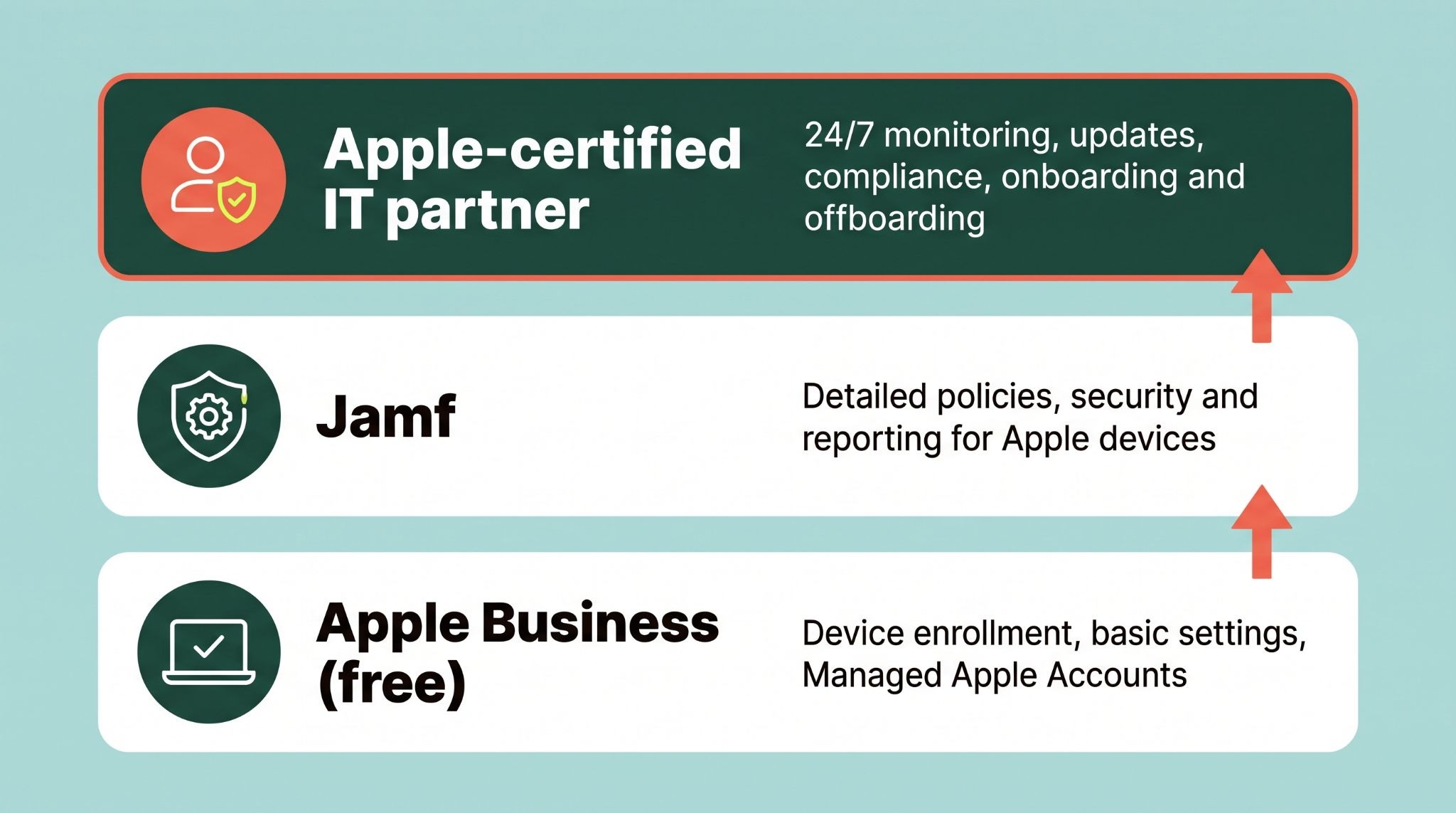
Apple Business helps you set devices up and apply basic settings. Independent reviews of the platform note what it does not cover for most businesses:
Those gaps matter more this year. In late September, Apple released emergency updates for a flaw it said may have been exploited in an extremely sophisticated attack, affecting Macs running older versions of macOS. In October, researchers reported ICMacOS, a Mac password stealer that tricks users with a fake System Preferences prompt, then takes saved passwords, browser data and keychain contents. A Mac that is set up correctly but never monitored is still exposed.
In many growing companies, Apple devices end up managed by whoever knows Macs best, on top of their real job. Every new hire, departure, macOS release and security alert adds to that load. macOS Golden Gate 27.2 arrived on October 26, and each update has to be tested, rolled out and confirmed across every device.
A managed IT partner with Apple expertise takes that work on, so your team gets devices that simply work and stay protected.
| What it takes | What an Apple-savvy IT partner handles |
|---|---|
| Setup | Configures Apple Business and device management, so new Macs and iPhones arrive ready to use |
| Updates | Tests and rolls out macOS and iOS updates, and confirms every device installed them |
| Security | Adds endpoint protection and 24/7 monitoring on top of Apple’s built-in features |
| People changes | Sets up new hires on day one and removes access the moment someone leaves |
| Compliance | Keeps the records auditors, insurers and clients expect |
| Mixed fleets | Manages Macs and Windows PCs under one consistent set of policies |
Not every IT provider knows Apple well. When you compare options, look for:
For more context, read why Macs need endpoint security, the hidden security gap in Apple Business Manager and Managed IT Services for businesses using Windows and Mac.
Parachute is a Managed IT Services provider with offices in Los Angeles, Irvine and San Diego, along with San Francisco, San Jose, San Ramon and Sacramento. Our Apple ecosystem team holds Jamf 400 certification and Apple Certified Support credentials, and manages Mac, iPhone and iPad fleets alongside Windows environments.
Apple Business is Apple’s free platform for companies, launched in April 2026. It replaced Apple Business Manager, Apple Business Essentials and Apple Business Connect, and includes device enrollment, built-in device management, Managed Apple Accounts and tools for managing how a business appears in Apple apps.
Jamf is a device management and security platform built specifically for Apple devices. Apple Business handles enrollment and basic management at no cost, while Jamf adds deeper configuration, security and reporting. Many growing businesses use both, with Apple Business for enrollment and Jamf to manage and protect devices day to day, often run by an IT partner certified in Jamf.
For most businesses, no. Apple Business covers setup and basic management, but not threat detection and response, vulnerability management, compliance evidence or management of non-Apple devices. Most growing companies pair it with endpoint security and a managed IT partner.
Yes. Mac threats continue to grow, including password stealers such as ICMacOS, reported in October 2026, which uses a fake System Preferences prompt to steal passwords and browser data. Keeping Macs updated and monitored is essential.
Schedule a call with someone who’s actually helpful, and we’ll show you how your Apple devices are set up today and what it would take to keep them secure.

Apple Ecosystem
Paul Febre

Apple Ecosystem
Paul Febre

Apple Ecosystem
Paul Febre
